---
title: 将你的 Apple Watch 连接到 Runkeeper
description: "让我们一起在 Apple Watch 上设置 Runkeeper!\n\n1. 在你的 Apple Watch 上下载 Runkeeper 应用。 请访问 Watch 上的应用商店,并搜索“Runkeeper”。\n\n2. 在 Apple Watch 上打开 Runkeeper 应用,将出现提示界面,引导用户在 iPhone 上 登陆 Runkeeper 应用。"
---
[跳到内容](https://help.runkeeper.com/zh-cn/hc/将你的-apple-watch-连接到-runkeeper#main-content)
- [简体中文](https://help.runkeeper.com/zh-cn/hc/%E5%B0%86%E4%BD%A0%E7%9A%84-apple-watch-%E8%BF%9E%E6%8E%A5%E5%88%B0-runkeeper)
- [Deutsch](https://help.runkeeper.com/de/hc/deine-apple-watch-mit-runkeeper-verknüpfen)
- [English](https://help.runkeeper.com/en/hc/connecting-your-apple-watch-to-runkeeper)
- [Español](https://help.runkeeper.com/es/hc/vincular-tu-apple-watch-a-runkeeper)
- [Français](https://help.runkeeper.com/fr/hc/connecter-votre-apple-watch-à-runkeeper)
- [Italiano](https://help.runkeeper.com/it/hc/collegare-apple-watch-a-runkeeper)
- [Nederlands](https://help.runkeeper.com/nl/hc/je-apple-watch-verbinden-met-runkeeper)
- [Português - Brasil](https://help.runkeeper.com/pt-br/hc/como-conectar-o-seu-apple-watch-ao-runkeeper)
- [Svenska](https://help.runkeeper.com/sv/hc/ansluta-apple-watch-till-runkeeper)
- [Русский](https://help.runkeeper.com/ru/hc/подключение-apple-watch-к-runkeeper)
- [한국어](https://help.runkeeper.com/ko/hc/runkeeper에-apple-watch-연결하기)
- [日本語](https://help.runkeeper.com/ja/hc/apple-watchをrunkeeperに接続する)
简体中文
显示翻译的子菜单

打开主导航
关闭主导航
- - [简体中文](https://help.runkeeper.com/zh-cn/hc/%E5%B0%86%E4%BD%A0%E7%9A%84-apple-watch-%E8%BF%9E%E6%8E%A5%E5%88%B0-runkeeper)
- [Deutsch](https://help.runkeeper.com/de/hc/deine-apple-watch-mit-runkeeper-verknüpfen)
- [English](https://help.runkeeper.com/en/hc/connecting-your-apple-watch-to-runkeeper)
- [Español](https://help.runkeeper.com/es/hc/vincular-tu-apple-watch-a-runkeeper)
- [Français](https://help.runkeeper.com/fr/hc/connecter-votre-apple-watch-à-runkeeper)
- [Italiano](https://help.runkeeper.com/it/hc/collegare-apple-watch-a-runkeeper)
- [Nederlands](https://help.runkeeper.com/nl/hc/je-apple-watch-verbinden-met-runkeeper)
- [Português - Brasil](https://help.runkeeper.com/pt-br/hc/como-conectar-o-seu-apple-watch-ao-runkeeper)
- [Svenska](https://help.runkeeper.com/sv/hc/ansluta-apple-watch-till-runkeeper)
- [Русский](https://help.runkeeper.com/ru/hc/подключение-apple-watch-к-runkeeper)
- [한국어](https://help.runkeeper.com/ko/hc/runkeeper에-apple-watch-연결하기)
- [日本語](https://help.runkeeper.com/ja/hc/apple-watchをrunkeeperに接続する)
简体中文
显示翻译的子菜单
- [联系我们](https://share.hsforms.com/1B8cgssAhTq-4nq1BuiygeQns95q)
[联系我们](https://share.hsforms.com/1B8cgssAhTq-4nq1BuiygeQns95q)
我们有什么可以帮你?
- 没有建议,因为搜索字段为空。
1. [帮助中心](https://help.runkeeper.com/zh-cn/hc?hsLang=zh-cn)
2. [合作应用](https://help.runkeeper.com/zh-cn/hc/%E5%90%88%E4%BD%9C%E5%BA%94%E7%94%A8?hsLang=zh-cn)
3. [Apple Watch](https://help.runkeeper.com/zh-cn/hc/%E5%90%88%E4%BD%9C%E5%BA%94%E7%94%A8?hsLang=zh-cn#apple-watch)
# 将你的 Apple Watch 连接到 Runkeeper
让我们一起在 Apple Watch 上设置 Runkeeper!
1\. 在你的 Apple Watch 上下载 Runkeeper 应用。 请访问 Watch 上的应用商店,并搜索“Runkeeper”。
2\. 在 Apple Watch 上打开 Runkeeper 应用,将出现提示界面,引导用户在 iPhone 上 登陆 Runkeeper 应用。
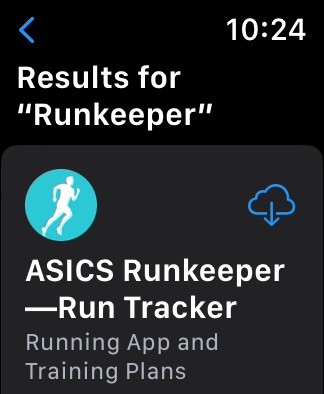
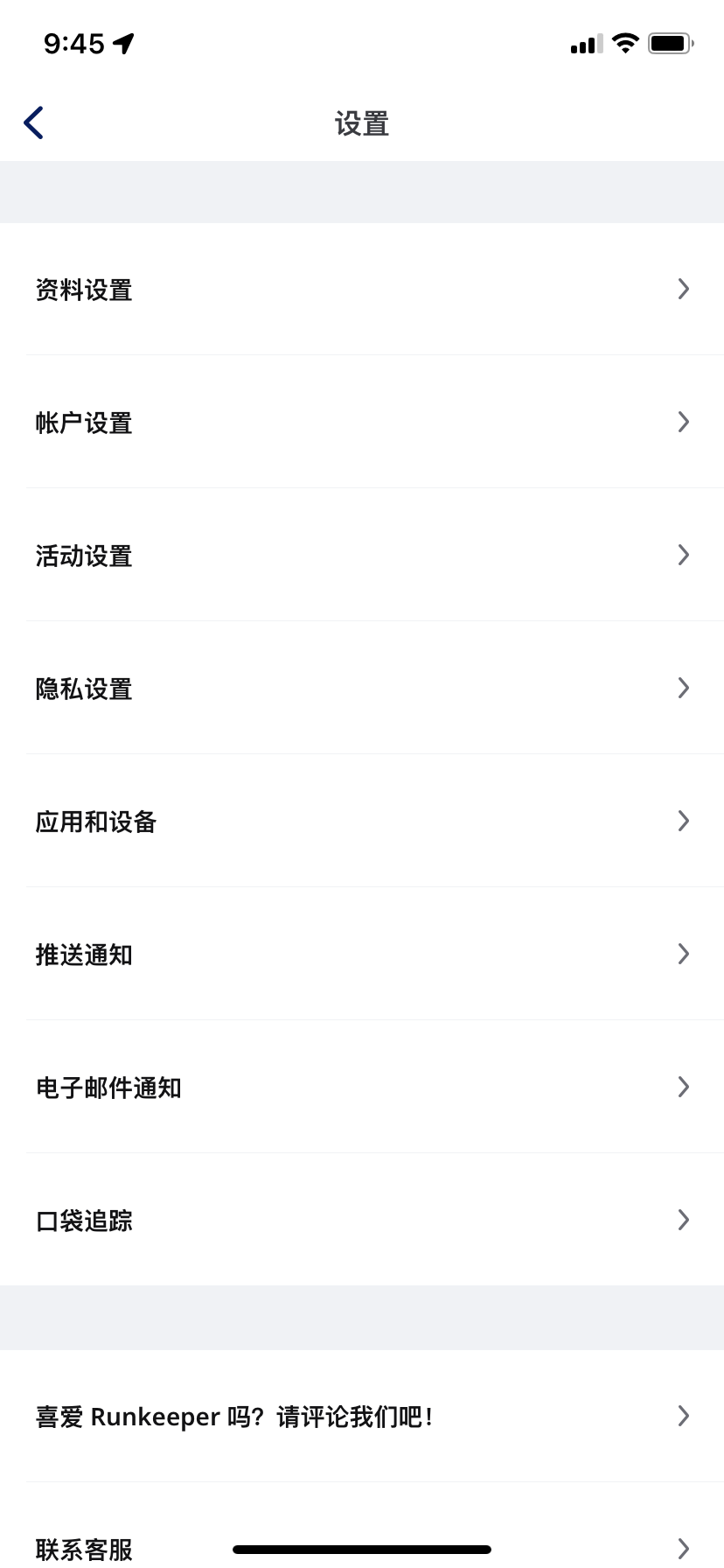
3\. 在你的 iPhone 上登录 Runkeeper 应用,并进入**“我”标签页面**。 在此页面,选择**“设置”齿轮**图标,随后选择 **“应用与设备”**。
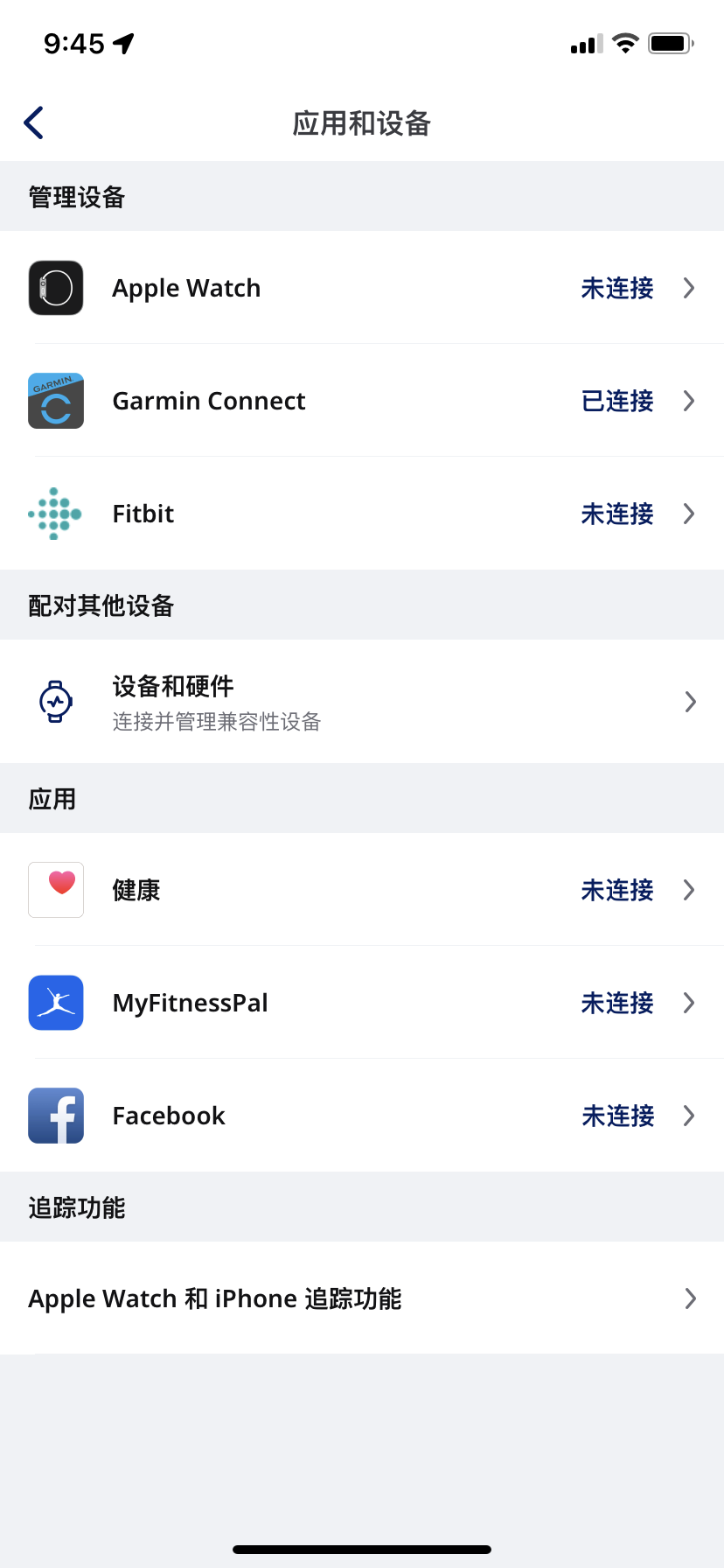
4\. 选择“管理设备”栏下的 **“Apple Watch”**。
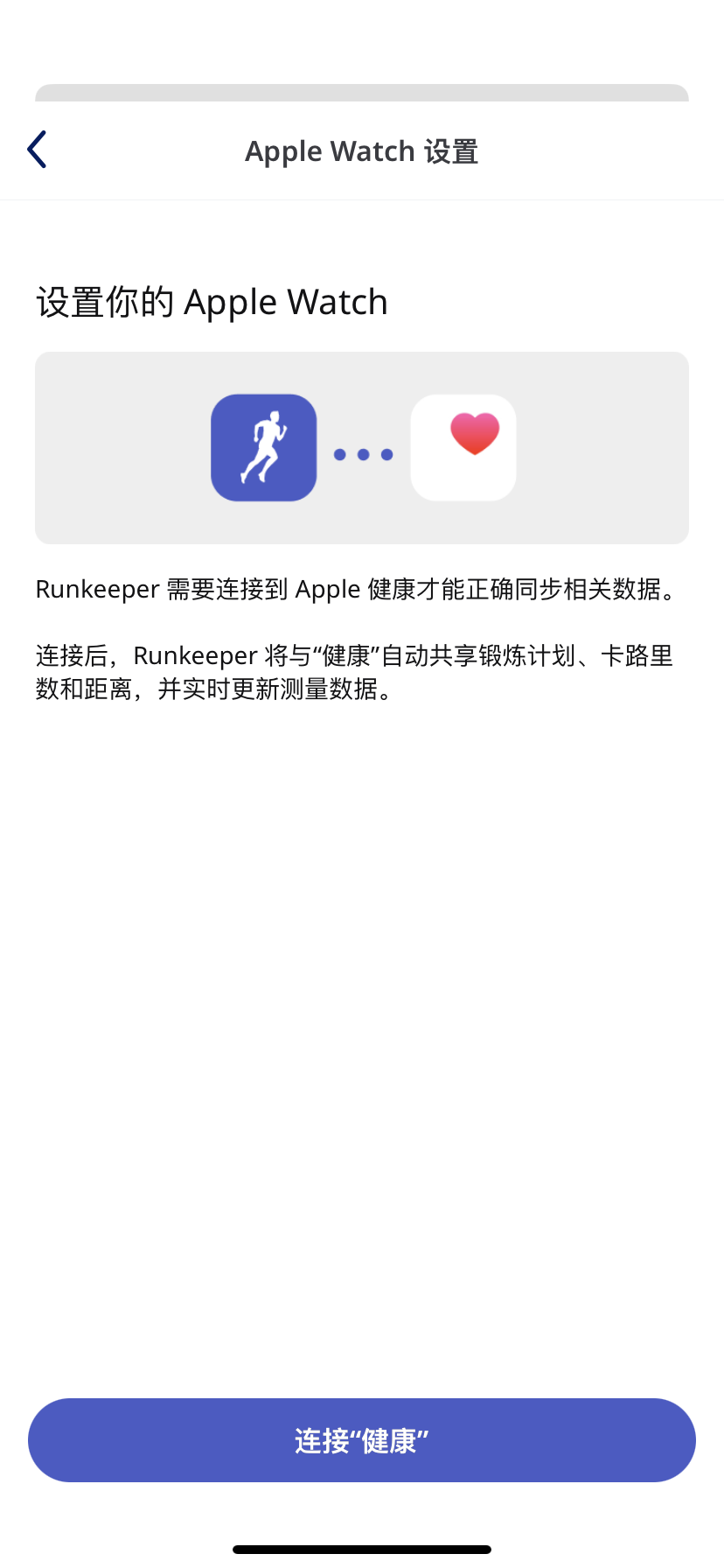
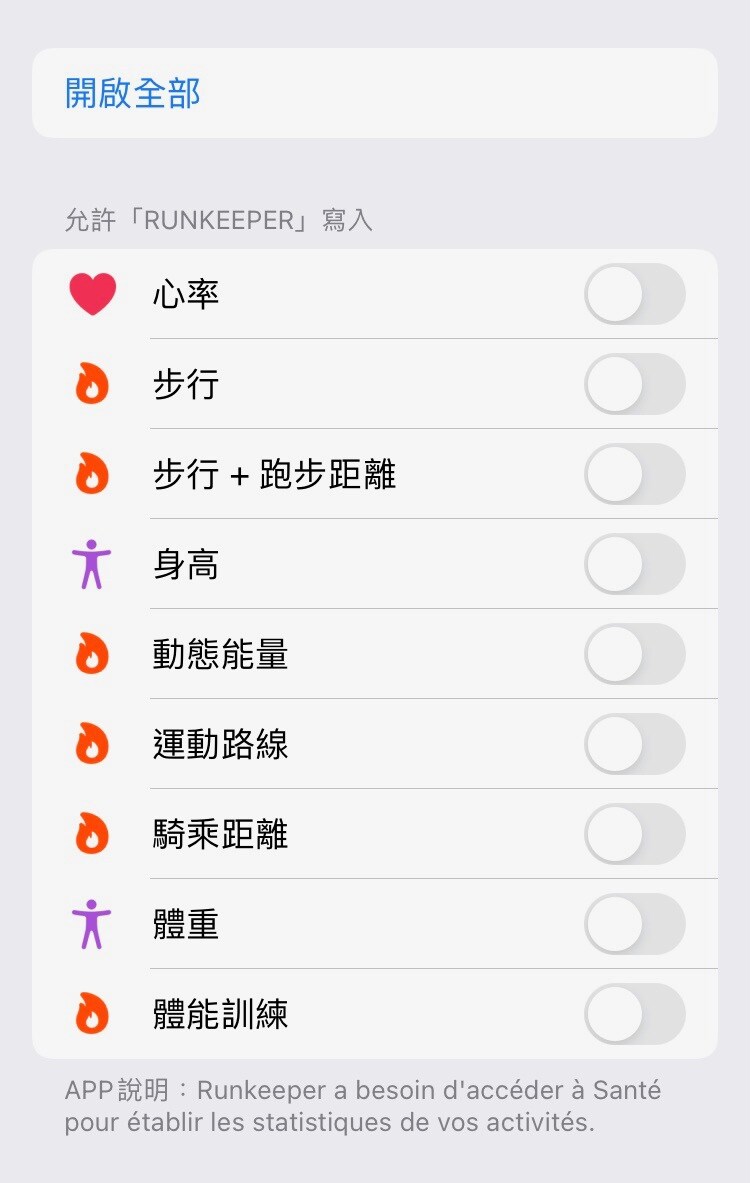
5\. 点击**连接“健康”**。
6\. 选择**“开启全部”**,允许 Runkeeper 访问你的所有健康数据,或者单独选择你希望 Runkeeper 访问的健康指标(请注意,未选择任何指标,或将影响你的活动追踪状况)。
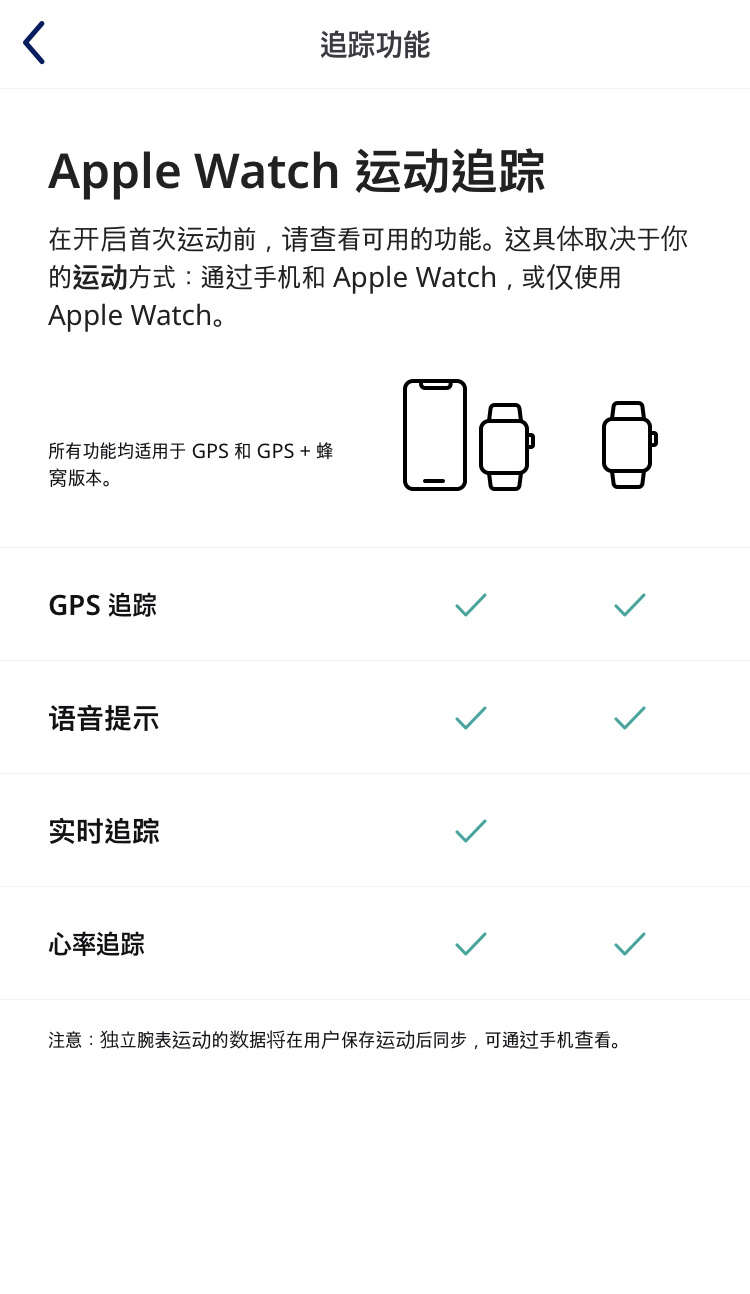
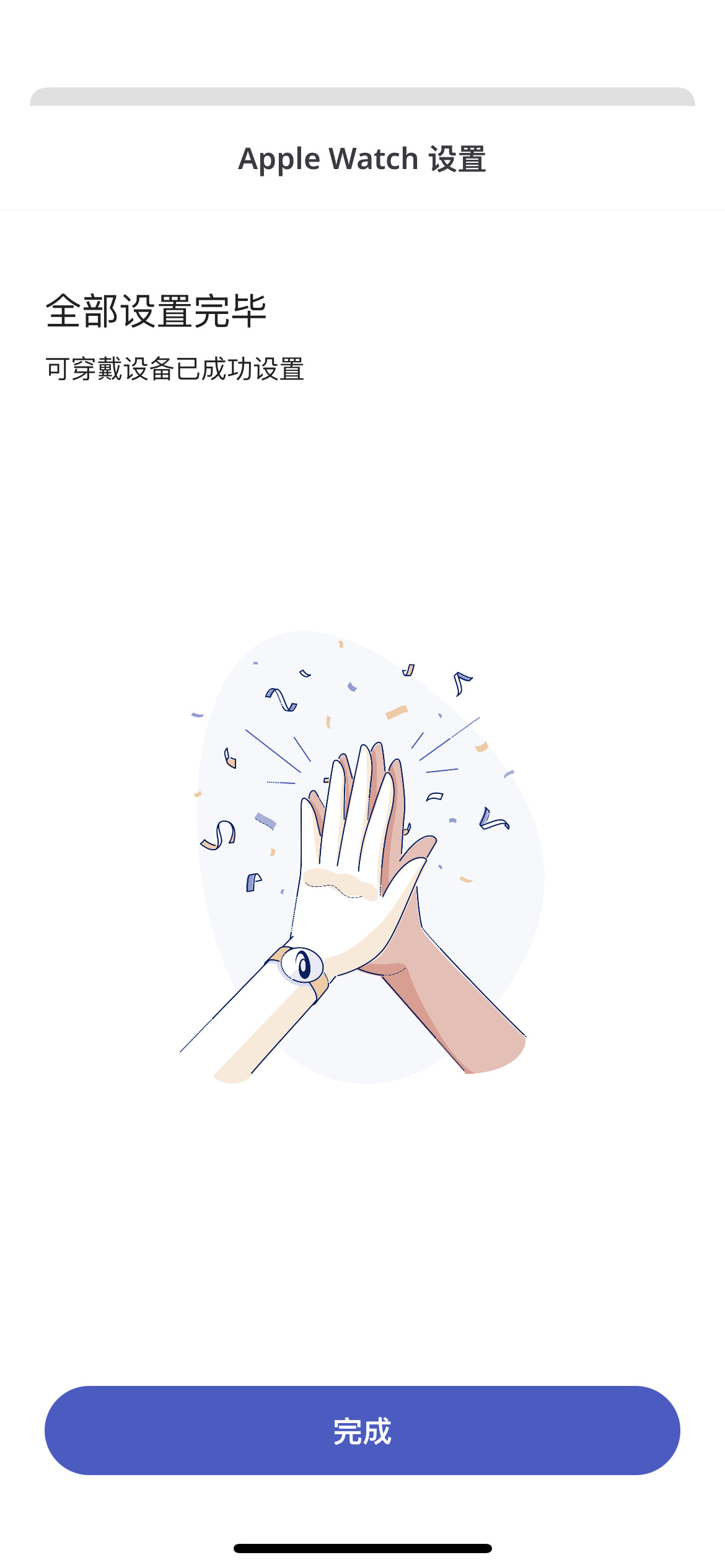
7\. 选择**“确认”**即可完成连接。请注意在此界面,查看基于手表或手机的两种活动开始方式及相应的功能差异。 选择**“完成”**即完成所有步骤,并返回应用。
*\*\*如果你不知何故无法使用 Runkeeper 在 Apple Watch 应用上追踪运动状况。请进入 iPhone 的设置,从应用列表中选择 Runkeeper 应用。 用户可在此界面检查个人****定位服务、通知及运动& 健身*\<2\>*设置状况。* \**
*\*仍有疑问? 请通过 support@runkeeper.com 联系我们的客服团队!*
- [帐户和个人资料](https://help.runkeeper.com/zh-cn/hc/%E5%B8%90%E6%88%B7%E5%92%8C%E4%B8%AA%E4%BA%BA%E8%B5%84%E6%96%99?hsLang=zh-cn#main-content)
- [帐户帮助](https://help.runkeeper.com/zh-cn/hc/%E5%B8%90%E6%88%B7%E5%92%8C%E4%B8%AA%E4%BA%BA%E8%B5%84%E6%96%99?hsLang=zh-cn#%E5%B8%90%E6%88%B7%E5%B8%AE%E5%8A%A9)
- [iPhone](https://help.runkeeper.com/zh-cn/hc/iphone?hsLang=zh-cn#main-content)
- [Start](https://help.runkeeper.com/zh-cn/hc/iphone?hsLang=zh-cn#start)
- [Android](https://help.runkeeper.com/zh-cn/hc/android?hsLang=zh-cn)
- [合作应用](https://help.runkeeper.com/zh-cn/hc/%E5%90%88%E4%BD%9C%E5%BA%94%E7%94%A8?hsLang=zh-cn#main-content)
- [Apple Watch](https://help.runkeeper.com/zh-cn/hc/%E5%90%88%E4%BD%9C%E5%BA%94%E7%94%A8?hsLang=zh-cn#apple-watch)
[](http://raceroster.com)
[mailto:email@email.com](mailto:email@email.com)
版权所有 © 2026, Race Roster