---
title: Runkeeper Go 구독 취소 방법
description: 구독은 쉬운데 구독 취소는 늘 어려웠던 경험, 다들 있으시죠? Runkeeper Go는 구독도, 구독 취소도 쉽고 간편하게 할 수 있어요! 이 글을 읽은 후에도 구독 취소와 관련된 문제가 있을 경우에는 하단에 나와 있는 안내에 따라 Runkeeper 지원팀으로 문의해 주세요. 최대한 신속하게 답변드리겠습니다.
---
[콘텐츠로 건너뛰기](https://help.runkeeper.com/ko/hc/runkeeper-go-구독-취소-방법#main-content)
- [한국어](https://help.runkeeper.com/ko/hc/runkeeper-go-%EA%B5%AC%EB%8F%85-%EC%B7%A8%EC%86%8C-%EB%B0%A9%EB%B2%95)
- [Deutsch](https://help.runkeeper.com/de/hc/so-kündigst-du-dein-runkeeper-go-abonnement)
- [English](https://help.runkeeper.com/en/hc/how-to-cancel-a-runkeeper-go-subscription)
- [Español](https://help.runkeeper.com/es/hc/cómo-cancelar-tu-suscripción-a-runkeeper-go)
- [Français](https://help.runkeeper.com/fr/hc/comment-annuler-un-abonnement-à-runkeeper-go)
- [Italiano](https://help.runkeeper.com/it/hc/come-annullare-un-abbonamento-runkeeper-go)
- [Nederlands](https://help.runkeeper.com/nl/hc/hoe-kun-je-een-runkeeper-go-abonnement-annuleren)
- [Português - Brasil](https://help.runkeeper.com/pt-br/hc/como-cancelar-uma-assinatura-runkeeper-go)
- [Svenska](https://help.runkeeper.com/sv/hc/så-avslutar-du-en-prenumeration-på-runkeeper)
- [日本語](https://help.runkeeper.com/ja/hc/runkeeper-go-の契約をキャンセルする方法)
한국어
번역을 위한 하위 메뉴 보기

기본 탐색 열기
기본 탐색 종료
- - [한국어](https://help.runkeeper.com/ko/hc/runkeeper-go-%EA%B5%AC%EB%8F%85-%EC%B7%A8%EC%86%8C-%EB%B0%A9%EB%B2%95)
- [Deutsch](https://help.runkeeper.com/de/hc/so-kündigst-du-dein-runkeeper-go-abonnement)
- [English](https://help.runkeeper.com/en/hc/how-to-cancel-a-runkeeper-go-subscription)
- [Español](https://help.runkeeper.com/es/hc/cómo-cancelar-tu-suscripción-a-runkeeper-go)
- [Français](https://help.runkeeper.com/fr/hc/comment-annuler-un-abonnement-à-runkeeper-go)
- [Italiano](https://help.runkeeper.com/it/hc/come-annullare-un-abbonamento-runkeeper-go)
- [Nederlands](https://help.runkeeper.com/nl/hc/hoe-kun-je-een-runkeeper-go-abonnement-annuleren)
- [Português - Brasil](https://help.runkeeper.com/pt-br/hc/como-cancelar-uma-assinatura-runkeeper-go)
- [Svenska](https://help.runkeeper.com/sv/hc/så-avslutar-du-en-prenumeration-på-runkeeper)
- [日本語](https://help.runkeeper.com/ja/hc/runkeeper-go-の契約をキャンセルする方法)
한국어
번역을 위한 하위 메뉴 보기
- [문의](https://share.hsforms.com/1dU6ri6qrRxOkuWhKNchE-Ans95q)
[문의](https://share.hsforms.com/1dU6ri6qrRxOkuWhKNchE-Ans95q)
무엇을 도와드릴까요?
- 검색 필드가 비어 있으므로 제안 사항이 없습니다.
1. [도움말 센터](https://help.runkeeper.com/ko/hc?hsLang=ko)
2. [Runkeeper Go](https://help.runkeeper.com/ko/hc/runkeeper-go?hsLang=ko)
3. [Runkeeper Go](https://help.runkeeper.com/ko/hc/runkeeper-go?hsLang=ko#runkeeper-go)
# Runkeeper Go 구독 취소 방법
구독은 쉬운데 구독 취소는 늘 어려웠던 경험, 다들 있으시죠? Runkeeper Go는 구독도, 구독 취소도 쉽고 간편하게 할 수 있어요! *이 글을 읽은 후에도 구독 취소와 관련된 문제가 있을 경우에는 하단에 나와 있는 안내에 따라 Runkeeper 지원팀으로 문의해 주세요. 최대한 신속하게 답변드리겠습니다.*
**Runkeeper.com에서 구독 서비스를 결제한 경우, 다음 안내에 따라 구독 취소를 진행해 주세요.**
1. Runkeeper.com에 로그인한 뒤 화면 오른쪽 상단 모서리에 있는 톱니바퀴 모양의 설정 아이콘을 탭하여 **설정** 페이지로 이동합니다.
2. [**구매 내역**](http://runkeeper.com/settings/subscriptions)을 선택합니다.
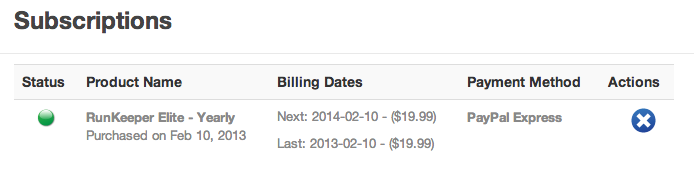
3. **구매 내역** 페이지에서 지금까지 결제한 모든 구매 내역을 확인할 수 있습니다.
4. **작업** 열에 표시된 파란색 X 버튼을 누르면 구독이 취소됩니다.
**iPhone 앱에서 구독 서비스를 결제한 경우**
- Apple App Store/iTunes에서 Runkeeper Go를 구독했다면, APPLE ID로 App Store에 로그인한 뒤 iTunes를 통해 구독을 취소해 주세요.
- iOS 인앱 결제건 취소 방법에 대한 자세한 내용은 [여기](https://support.apple.com/ko-kr/118428)에서 확인해 주세요.
- 구독 취소에 문제가 있을 경우 [여기](https://support.apple.com/ko-kr/billing)에서 Apple iTunes 지원팀에 문의해 주세요. iPhone 앱으로 결제한 구독 서비스는 Apple을 통해서는 취소가 가능하지만 Runkeeper가 대신 취소해 드릴 순 없습니다.
**Android 앱에서 구독 서비스를 결제한 경우**
- Android Runkeeper 앱을 통해 결제한 구독 서비스를 취소하려면 Google Play 스토어 계정에 로그인해주세요.
- Android 인앱 결제건 취소 방법에 대한 자세한 내용은 [여기](https://support.google.com/googleplay/answer/7018481?hl=ko&sjid=381486514603189303-NC)에서 확인해 주세요.
**Google Play에서 구독 취소와 관련된 문제가 발생할 경우**
- 이 페이지 하단에 나와 있는 링크를 통해 Runkeeper 지원팀으로 문의해 주세요. 문의 시 **Runkeeper 로그인 이메일 주소**, 그리고 Google Play에서 사용하는 이메일 주소(Runkeeper 로그인 이메일 주소와 다를 경우)를 알려 주세요.
- 알려주신 이메일 주소로 확인되는 구매 내역이 없을 경우, **GPA 번호**라고 부르는 Google Play 주문 번호가 필요합니다. 가능하다면 이 번호를 미리 확인해 주세요.
- Google Play 주문 번호는 Google Play에서 발송된 구매 확인 이메일에서 확인하실 수 있습니다.
- 이메일을 찾을 수 없다면 [https://payments.google.com/](https://payments.google.com?hl=ko-KR)으로 이동하여 Google 계정에 로그인 한 뒤 해당되는 Runkeeper 구매 내역을 직접 선택해 주세요. **거래 ID**는 영수증 하단에서 확인할 수 있습니다.
- 이 방법으로도 GPA 번호를 찾을 수 없을 경우에는 [Google Play 지원팀](https://support.google.com/googleplay/?hl=ko&sjid=381486514603189303-NC#topic=3364260)으로 문의해 주세요.
- 17~18자리 숫자가 보이게 스크린샷을 보내 주시면 Runkeeper가 구매건을 확인해 드립니다.
***참고:** 결제 후 48시간이 지나면 추가 요금 청구를 막기 위해 구독 서비스를 취소할 수 있지만, 구독을 취소해도 다음 청구일 이전까지는 Runkeeper Go를 계속 이용할 수 있습니다.*
**관련 글: [Runkeeper Go 요금 청구 도움말](https://help.runkeeper.com/en/hc/runkeeper-go-billing/refunds?hsLang=ko)**
*\*더 궁금한 점이 있으신가요? support@runkeeper.com을 통해 Runkeeper 지원팀으로 문의해 주세요!*
- [계정 및 프로필](https://help.runkeeper.com/ko/hc/%EA%B3%84%EC%A0%95-%EB%B0%8F-%ED%94%84%EB%A1%9C%ED%95%84?hsLang=ko#main-content)
- [계정 도움말](https://help.runkeeper.com/ko/hc/%EA%B3%84%EC%A0%95-%EB%B0%8F-%ED%94%84%EB%A1%9C%ED%95%84?hsLang=ko#%EA%B3%84%EC%A0%95-%EB%8F%84%EC%9B%80%EB%A7%90)
- [iPhone](https://help.runkeeper.com/ko/hc/iphone?hsLang=ko#main-content)
- [Start](https://help.runkeeper.com/ko/hc/iphone?hsLang=ko#start)
- [Android](https://help.runkeeper.com/ko/hc/android?hsLang=ko)
- [파트너 앱](https://help.runkeeper.com/ko/hc/%ED%8C%8C%ED%8A%B8%EB%84%88-%EC%95%B1?hsLang=ko#main-content)
- [Apple Watch](https://help.runkeeper.com/ko/hc/%ED%8C%8C%ED%8A%B8%EB%84%88-%EC%95%B1?hsLang=ko#apple-watch)
- [Runkeeper Go](https://help.runkeeper.com/ko/hc/runkeeper-go?hsLang=ko#main-content)
- [Runkeeper Go](https://help.runkeeper.com/ko/hc/runkeeper-go?hsLang=ko#runkeeper-go)
[](http://raceroster.com)
[mailto:email@email.com](mailto:email@email.com)
Copyright © 2026, Race Roster