---
title: Android のトラッキング画面について
description: トラッキングの準備ができたら、アプリの [開始] タブに移動してトラッキングを開始します。
---
[コンテンツまでスキップ](https://help.runkeeper.com/ja/hc/android-のトラッキング画面について#main-content)
- [日本語](https://help.runkeeper.com/ja/hc/android-%E3%81%AE%E3%83%88%E3%83%A9%E3%83%83%E3%82%AD%E3%83%B3%E3%82%B0%E7%94%BB%E9%9D%A2%E3%81%AB%E3%81%A4%E3%81%84%E3%81%A6)
- [English](https://help.runkeeper.com/en/hc/understanding-your-android-tracking-screen)
- [Nederlands](https://help.runkeeper.com/nl/hc/zo-werkt-je-android-registratiescherm)
- [Português - Brasil](https://help.runkeeper.com/pt-br/hc/entenda-a-tela-de-monitoramento-no-android)
- [Svenska](https://help.runkeeper.com/sv/hc/att-förstå-spårningsskärmen-på-android)
日本語
翻訳のサブメニューを表示

メインナビゲーションを開く
メインナビゲーションを閉じる
- - [日本語](https://help.runkeeper.com/ja/hc/android-%E3%81%AE%E3%83%88%E3%83%A9%E3%83%83%E3%82%AD%E3%83%B3%E3%82%B0%E7%94%BB%E9%9D%A2%E3%81%AB%E3%81%A4%E3%81%84%E3%81%A6)
- [English](https://help.runkeeper.com/en/hc/understanding-your-android-tracking-screen)
- [Nederlands](https://help.runkeeper.com/nl/hc/zo-werkt-je-android-registratiescherm)
- [Português - Brasil](https://help.runkeeper.com/pt-br/hc/entenda-a-tela-de-monitoramento-no-android)
- [Svenska](https://help.runkeeper.com/sv/hc/att-förstå-spårningsskärmen-på-android)
日本語
翻訳のサブメニューを表示
- [お問い合わせ](https://share.hsforms.com/105f_RDYGS16-9PZNuPjraQns95q)
[お問い合わせ](https://share.hsforms.com/105f_RDYGS16-9PZNuPjraQns95q)
何かお困りですか?
- 検索フィールドが空なので、候補はありません。
1. [ヘルプセンター](https://help.runkeeper.com/ja/hc?hsLang=ja)
2. [Android](https://help.runkeeper.com/ja/hc/android?hsLang=ja)
# Android のトラッキング画面について
**トラッキングの準備ができたら**、アプリの \[**スタート**\] タブに移動してトラッキングを開始します。
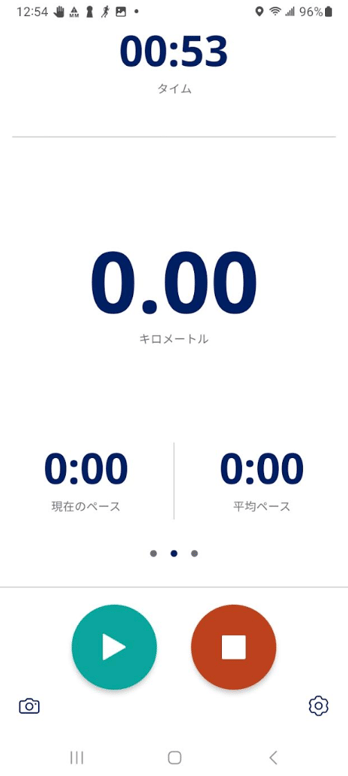
アクティビティ開始後は、次の3種類の既定データが表示されます。
- 経過時間
- 距離
- \[現在のペース\] と \[平均ペース\]
-png.png?width=342&height=757&name=Screenshot%202025-07-07%20at%2010-20-59%20(1)-png.png)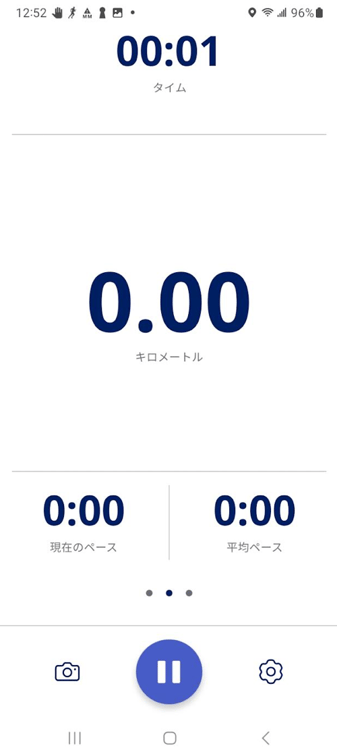
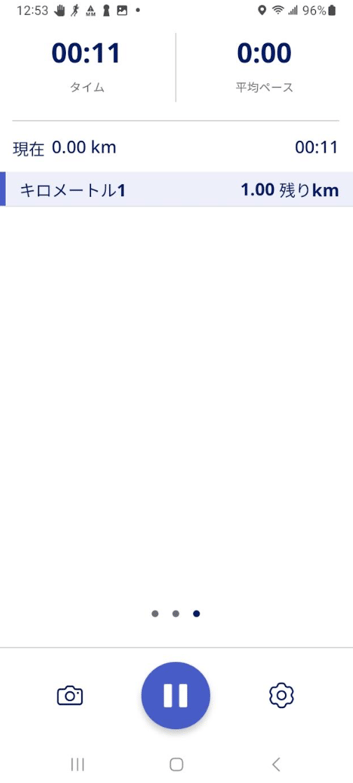
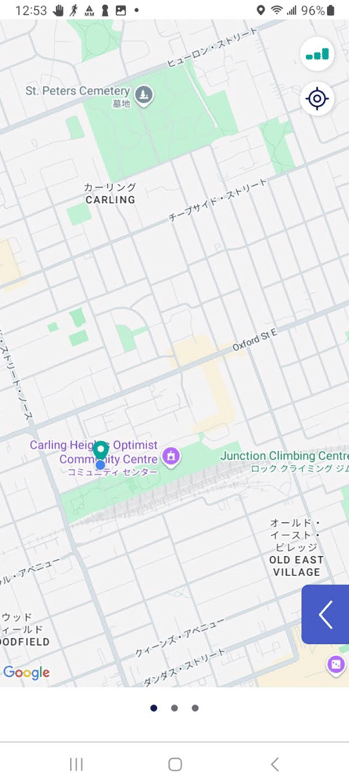
スワイプして、次のとおりその他のデータを表示できます。
- 左スワイプで \[**スプリット**\] 画面
- 右スワイプでアクティビティの \[**地図表示**\]
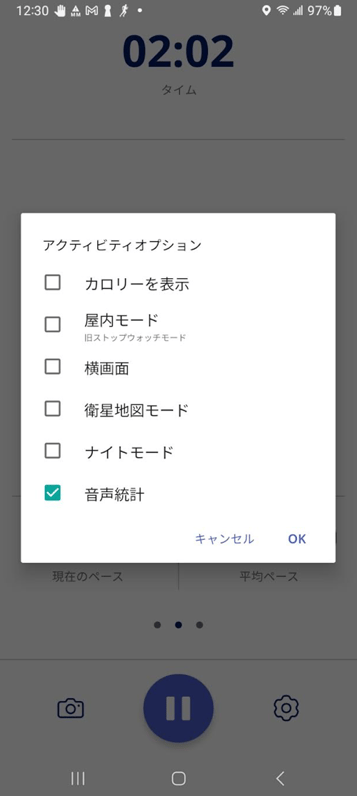
左下角の設定のボタンを選択すると、\[**アクティビティのオプション**\] パネルが表示されます。 このパネルでは、次に挙げる操作が可能です。
- \[**カロリー**\] の表示
- \[**屋内モード**\] への切り替え (屋内でのトラッキング用)
- 画面の**表示方向を \[横画面\] に変更**
- \[**衛星地図**\] 表示を有効に切り替え
- \[**ナイトモード**\] でトラッキング画面の背景を暗くすること
- 音声指示のオン・オフ切り替えと \[**音声設定**\] オプション
****
**アクティビティを一時停止・ストップするには**
**一時停止**ボタンを押してアクティビティを**再開**・**ストップ**できます。
**ストップ**ボタンを選択すると、\[**アクティビティを保存**\]に移動します。
-png.png?width=346&height=774&name=Screenshot%202025-07-03%20at%2012-59-36%20(1)-png.png)
\*他にもご不明な点がありましたら、 サポートチーム(support@runkeeper.com)までお問い合わせください。
- [アカウントとプロフィール](https://help.runkeeper.com/ja/hc/%E3%82%A2%E3%82%AB%E3%82%A6%E3%83%B3%E3%83%88%E3%81%A8%E3%83%97%E3%83%AD%E3%83%95%E3%82%A3%E3%83%BC%E3%83%AB?hsLang=ja#main-content)
- [アカウントのヘルプ](https://help.runkeeper.com/ja/hc/%E3%82%A2%E3%82%AB%E3%82%A6%E3%83%B3%E3%83%88%E3%81%A8%E3%83%97%E3%83%AD%E3%83%95%E3%82%A3%E3%83%BC%E3%83%AB?hsLang=ja#%E3%82%A2%E3%82%AB%E3%82%A6%E3%83%B3%E3%83%88%E3%81%AE%E3%83%98%E3%83%AB%E3%83%97)
- [iPhone](https://help.runkeeper.com/ja/hc/iphone?hsLang=ja#main-content)
- [Me](https://help.runkeeper.com/ja/hc/iphone?hsLang=ja#me)
- [Start](https://help.runkeeper.com/ja/hc/iphone?hsLang=ja#start)
- [Android](https://help.runkeeper.com/ja/hc/android?hsLang=ja)
- [Website](https://help.runkeeper.com/ja/hc/website?hsLang=ja)
- [パートナーのアプリ](https://help.runkeeper.com/ja/hc/%E3%83%91%E3%83%BC%E3%83%88%E3%83%8A%E3%83%BC%E3%81%AE%E3%82%A2%E3%83%97%E3%83%AA?hsLang=ja#main-content)
- [Apple Watch](https://help.runkeeper.com/ja/hc/%E3%83%91%E3%83%BC%E3%83%88%E3%83%8A%E3%83%BC%E3%81%AE%E3%82%A2%E3%83%97%E3%83%AA?hsLang=ja#apple-watch)
- [パートナーのアプリ](https://help.runkeeper.com/ja/hc/%E3%83%91%E3%83%BC%E3%83%88%E3%83%8A%E3%83%BC%E3%81%AE%E3%82%A2%E3%83%97%E3%83%AA?hsLang=ja#%E3%83%91%E3%83%BC%E3%83%88%E3%83%8A%E3%83%BC%E3%81%AE%E3%82%A2%E3%83%97%E3%83%AA)
- [基本事項](https://help.runkeeper.com/ja/hc/%E5%9F%BA%E6%9C%AC%E4%BA%8B%E9%A0%85?hsLang=ja#main-content)
- [Getting Started](https://help.runkeeper.com/ja/hc/%E5%9F%BA%E6%9C%AC%E4%BA%8B%E9%A0%85?hsLang=ja#getting-started)
- [トレーニング](https://help.runkeeper.com/ja/hc/%E3%83%88%E3%83%AC%E3%83%BC%E3%83%8B%E3%83%B3%E3%82%B0?hsLang=ja#main-content)
- [Training Plans](https://help.runkeeper.com/ja/hc/%E3%83%88%E3%83%AC%E3%83%BC%E3%83%8B%E3%83%B3%E3%82%B0?hsLang=ja#training-plans)
- [Runkeeper Go](https://help.runkeeper.com/ja/hc/runkeeper-go?hsLang=ja#main-content)
- [Runkeeper Go](https://help.runkeeper.com/ja/hc/runkeeper-go?hsLang=ja#runkeeper-go)
[](http://raceroster.com)
[mailto:email@email.com](mailto:email@email.com)
Copyright © 2026, Race Roster